Toddler Mode was built backwards from one question: what would make it truly safe to hand a little one your phone? Not a settings workaround, not a screen-time timer, but a real toddler lock that childproofs your iPhone. The answer is layers, and we built every one of them into the app itself.
A world you build
Every child gets their own profile with their own apps, photos, and videos. You approve each one from your own dashboard and adjust the settings accordingly. If you don't put the app in their world, it isn't there.
A PIN on every exit
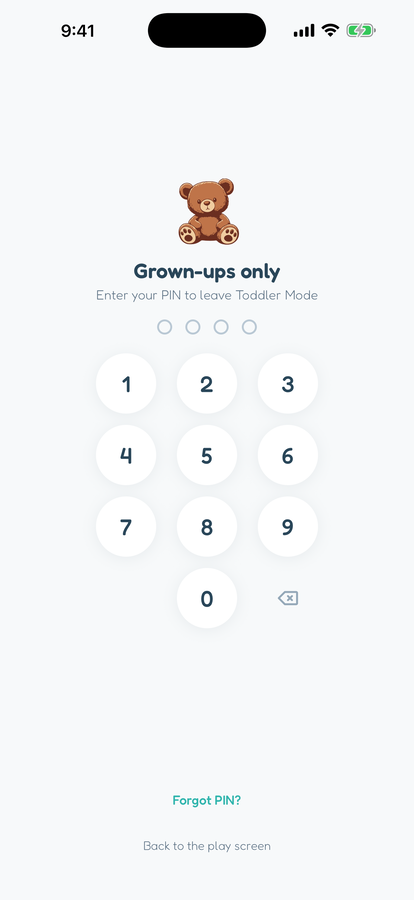
Inside Toddler Mode, every path leads back to their approved apps. Getting from their screen to the grown-up side takes your 4-digit PIN, and three wrong guesses simply return the phone to their world.
It nudges you to lock up
Every time you start Toddler Mode without Toddler Lock, the app reminds you to turn it on, and shows a banner while the hardware lock is active. The safest setup is always one triple-click away.
Nothing to find
No ads, no in-app purchases, no links to the internet, and no algorithm feeding them more. Every app is built by us with low-stimulation at the forefront. There is simply nothing in their world that leads anywhere you haven't approved.
THE ONLY DOOR OUT
Your PIN, or nothing
This is the screen a curious toddler meets if they try to leave: a grown-ups-only PIN pad, and a gentle return to their own world after three wrong guesses. No ads to tap, no settings to find, no way to wander into your email, banking, or camera roll.
ONE MORE LAYER, IF YOU WANT IT: TODDLER LOCK
Lock the phone's buttons too
Apple doesn't let any app disable the home swipe or side button, so a determined little one could still exit to your home screen. Apple's built-in Guided Access feature closes that last gap by locking the whole phone to one app: Toddler Mode.
Inside our app, we walk you through setting it up the first time, then it's a triple-click to lock and a triple-click plus your passcode to unlock. We even show a reminder banner whenever it's on and a notification banner when it's off.
1 Set up Guided Access once in Settings, Accessibility
2 Start Toddler Mode, then triple-click the side button to lock